To be honest, this is a category I am not as experienced in, as I have only started learning about it recently.
Since Hyperline Racing is supposed to have a stylized look, I wanted the world to be full of bright, saturated colors.
However, I found that Unreal Engine’s default, realistic rendering style tends to wash out those bright colors, needed to create that vibrant and stylized look.
This is the current state of the lobby…
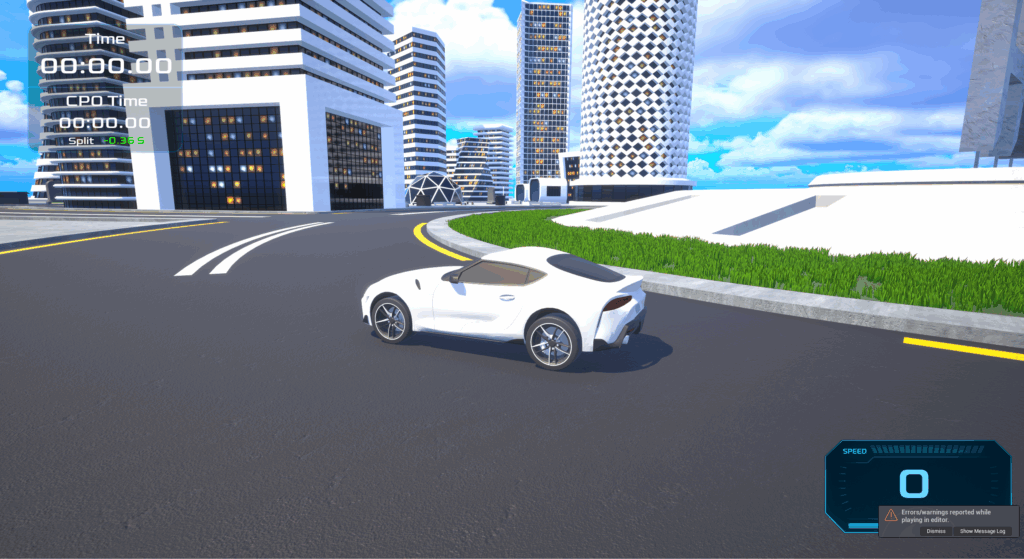
I am not the happiest with this result, but I feel like it looks way better than before.
Here are some of the most valuable tips I can give on lighting and post process effects in Unreal Engine:
These tips will mostly apply for games with stylized lighting.
- Prioritize emissive materials over light assets. While this is more of a design choice, emissive materials can emit light onto surfaces (if Lumen is enabled) just with overall better performance.
- Lower True Curve amount. This setting (when lowered), tends to saturate colors, especially blues and greens. This is perfect for a stylized look.
- Use LUT’s. LUT’s can unify colors in a scene, making colors blend smoothly. This is perfect for designing a consistent art style.
- Use vibrant colors when texturing assets. Relying too heavily on post-process effects can make scenes look over-corrected or “filtered,” so starting with naturally vibrant textures helps maintain a clean, stylized look.
Insert video here.
Again, I am still learning, this is just what has helped me. If anybody has any feedback, reply below.
Leave a Reply